
Key points
- An import of goods in TallyPrime 7.2 needs three vouchers: a Purchase voucher for the foreign supplier, a Payment voucher for the duty paid on ICEGATE, and a Journal voucher that claims the IGST as input tax credit.
- Basic Customs Duty and Social Welfare Surcharge paid on an import are part of the cost of the goods, so their ledgers belong under Purchase Accounts or Direct Expenses, not under Duties & Taxes.
- IGST paid to Customs on a Bill of Entry is claimed in GSTR-3B Table 4(A)(1) as Import of goods, and is never reported as reverse charge in Table 3.1(d).
- The foreign supplier ledger is credited only with the invoice value at the exchange rate on the invoice date; the customs exchange rate printed on the Bill of Entry is used only to compute duty.
- Under Section 16(4) of the CGST Act, ITC on imports for FY 2025-26 must be claimed by 30 November 2026 or the date of filing the FY 2025-26 annual return, whichever is earlier.
The supplier ledger shows ₹13,13,078 to pay. The Singapore supplier's invoice says USD 12,000. Somewhere in your entry, the duty you paid on ICEGATE got added to the supplier's balance, and now the outstanding report is wrong by exactly the challan amount. This happens because most people try to put the whole Bill of Entry into one Purchase voucher. Split it into three vouchers, run them through a clearing ledger, and the figures stop fighting each other.
What Is an Import of Goods Entry in Tally?
An import has two separate creditors. The foreign supplier is owed the invoice value. Indian Customs is owed BCD, SWS and IGST, which you pay before the goods are released. Your books must keep these apart. Think of it like buying a car: the dealer gets the car price, the RTO gets registration, and nobody adds the RTO fee to the dealer's bill. In Tally, the Bill of Entry gives you the duty figures. The supplier's invoice gives you the supplier's amount.
How to Pass an Import of Goods Entry in TallyPrime 7.2 — Step by Step
The worked figures below are illustrative. The invoice is USD 12,000 on CIF terms, with HDFC Bank's rate of ₹83.40 on the invoice date. The Bill of Entry uses an assumed customs rate of ₹84.00, which gives an assessable value of ₹10,08,000. BCD at 10% is ₹1,00,800. SWS at 10% of BCD is ₹10,080. IGST at 18% on ₹11,18,880 is ₹2,01,398. The total duty paid is ₹3,12,278.
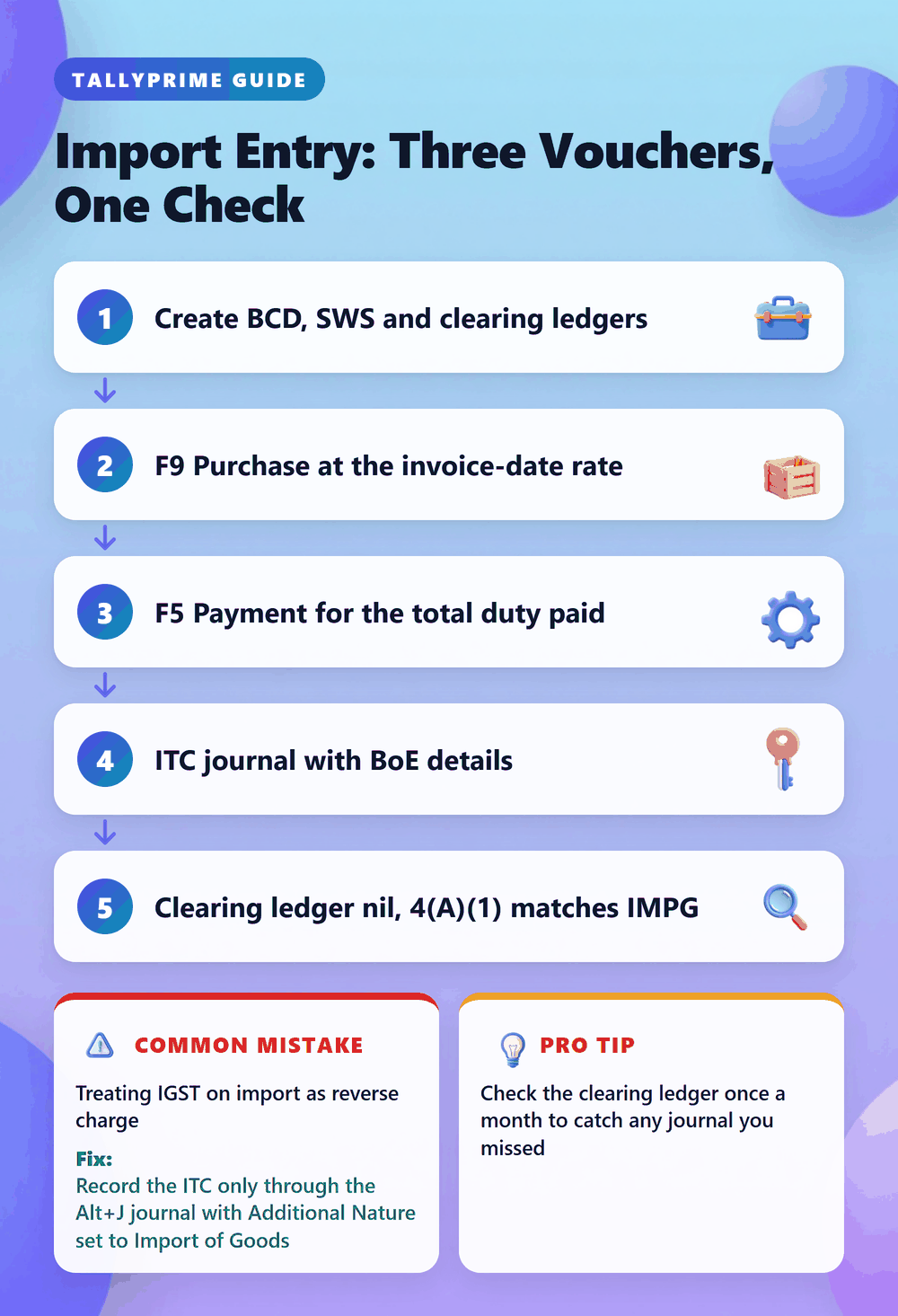
- Create four ledgers once. Go to Gateway of Tally > Create > Ledger. The first is "Basic Customs Duty" under Purchase Accounts (or Direct Expenses), with GST applicability set to Not Applicable. The second is "Social Welfare Surcharge", set up the same way. The third is "Customs Duty Clearing – ICEGATE" under Current Liabilities. The fourth is your existing "Input IGST" under Duties & Taxes, with Type of Duty/Tax set to GST and Tax Type set to IGST. If BCD sits under Duties & Taxes, it shows as a recoverable asset on the balance sheet, and it is not recoverable.
- Create the supplier ledger under Sundry Creditors. Set the Country to the supplier's country, for example Singapore, and leave GSTIN blank. If you use multi-currency, set the ledger currency to USD. Tally tip: a country other than India is what tells TallyPrime 7.2 to treat the purchase as an import. You do not need a special registration type for that.
- Record the Purchase voucher (F9). Date it on the supplier's invoice date. Credit the supplier for USD 12,000 at ₹83.40, which is ₹10,00,800. Debit an "Import Purchase" ledger or your stock items with the same value. Do not select the IGST ledger in this voucher. Some people use the Bill of Entry value of ₹10,08,000 here. The supplier will never be paid that figure, so the outstanding report will carry a ₹7,200 difference that never clears.
- Record the duty Payment voucher (F5) on the challan date. Debit Basic Customs Duty ₹1,00,800, Social Welfare Surcharge ₹10,080 and Customs Duty Clearing – ICEGATE ₹2,01,398. Credit HDFC Bank ₹3,12,278. In the narration, enter the ICEGATE challan number and the Bill of Entry number. Tally tip: the total must equal the "Total Duty Paid" printed on the first page of the Bill of Entry. Check that before you save.
- Record the ITC Journal voucher (F7). In the Journal screen, press Alt+J (Stat Adjustment). Choose Type of Duty/Tax: GST, Nature of Adjustment: Increase of Input Tax Credit, and Additional Nature of Adjustment: Import of Goods. Debit Input IGST ₹2,01,398 and credit Customs Duty Clearing – ICEGATE ₹2,01,398. Enter the Bill of Entry number, Bill of Entry date, the 6-character port code and the assessable value in the GST details. If you skip Alt+J, the IGST sits in your ledger but does not appear in GSTR-3B Table 4(A)(1).
- Check that the clearing ledger is nil. Go to Gateway of Tally > Display More Reports > Account Books > Ledger and select Customs Duty Clearing – ICEGATE. It should be zero for every Bill of Entry. Any balance means a duty payment has no matching ITC journal. Tally tip: if you have five shipments in a month, this one ledger shows you which Bill of Entry you missed.
- Verify the GST return view. Go to Gateway of Tally > Display More Reports > GST Reports > GSTR-3B, then drill into Table 4(A)(1) Import of goods. Then compare the IGST figure, Bill of Entry by Bill of Entry, with the IMPG section of GSTR-2B on the GST portal before you file on the 20th. If the figure appears under 3.1(d) inward supplies liable to reverse charge, you will pay the IGST twice, once to Customs and once in cash through GSTR-3B.
Mistakes That Cost Indian CAs Hours
- Mistake: treating IGST on import as reverse charge. What breaks: GSTR-3B shows an RCM liability in 3.1(d), and the client pays that IGST again through the cash ledger. Fix: delete the RCM tagging. Record the ITC only through the Alt+J journal with Additional Nature set to Import of Goods, so it lands in 4(A)(1).
- Mistake: putting customs duty in the supplier's Purchase voucher. What breaks: the creditor balance gets inflated by the duty, and the payment to the overseas supplier never matches the bill. Fix: the supplier ledger carries the invoice value only. Duty belongs in the separate Payment voucher dated on the ICEGATE challan date.
- Mistake: claiming ITC on interest or late fee paid with the Bill of Entry. What breaks: the IGST ledger is overstated, and the figure no longer matches GSTR-2B IMPG. Fix: debit the interest shown on the Bill of Entry to an "Interest on Customs Duty" ledger under Indirect Expenses. It is not tax, and it is not cost of goods.
- Mistake: booking the Bill of Entry exchange rate difference as forex gain or loss. What breaks: you create a ₹7,200 "loss" that is not real. The customs rate is a notified rate under Section 14 of the Customs Act, 1962, used only to value goods for duty. Fix: forex gain or loss arises only between the invoice-date rate and the rate on the day you actually remit to the supplier.
- Mistake: filing the Bill of Entry PDF and forgetting it until the annual audit. What breaks: ITC that never reached GSTR-2B because of a GSTIN mismatch on ICEGATE, found after the Section 16(4) window has closed. For FY 2025-26, that window closes on 30 November 2026. Fix: compare the IMPG section of GSTR-2B with Tally every month, not every year.
Pro Tips for 2026
Clearing agents (CHAs) often pay the duty for your client and then bill it back with their own charges. In that case, credit the CHA's ledger instead of the bank in the duty Payment voucher, and turn it into a Journal. The CHA's agency fee is a separate purchase with its own 18% GST and its own invoice. Do not mix it into the Bill of Entry figures.
Date the ITC journal on or after the out-of-charge date shown on the Bill of Entry. Goods not yet released are not yet received, and receipt is a condition for ITC under Section 16(2)(b).
At March 31, check the closing stock. If imported stock is still unsold, add its share of BCD and SWS to the closing stock value. AS 2 counts non-recoverable import duties as part of the cost of purchase. Tally's stock summary will not do this automatically, because the duty was posted through a Payment voucher and not against the stock items.
Use this infographic on your site
Free to share. Copy this code and keep the credit link.
Q: How to pass entry in Tally for import of goods in TallyPrime 7.2?
Pass three vouchers. First, record a Purchase voucher (F9) crediting the foreign supplier with the invoice value. Second, record a Payment voucher (F5) debiting BCD, SWS and a Customs Duty Clearing ledger, and crediting the bank. Third, record a Journal voucher (F7), press Alt+J, choose Increase of Input Tax Credit and then Import of Goods, and debit Input IGST against the clearing ledger. Enter the Bill of Entry number, date and port code in the journal.
Q: Is IGST on import of goods paid under reverse charge?
No. IGST on imported goods is collected by Customs on the Bill of Entry, together with the customs duty. It is claimed as ITC in GSTR-3B Table 4(A)(1). It is not shown in Table 3.1(d). Reverse charge applies to imports of services, not goods.
Q: Can I take input tax credit of basic customs duty?
No. Basic Customs Duty and Social Welfare Surcharge are not GST, so no ITC is available on them. Add them to the cost of the goods by keeping their ledgers under Purchase Accounts or Direct Expenses. Only the IGST, and any compensation cess, on the Bill of Entry is creditable.
Q: Import entry in Tally ERP 9 vs TallyPrime 7.2 — what is different?
The accounting is the same in both: a Purchase voucher, a duty Payment voucher, and an IGST journal using Stat Adjustment with Increase of Input Tax Credit and Import of Goods. Tally ERP 9 also uses Alt+J for Stat Adjustment, but some screen layouts differ. TallyPrime 7.2 creates ledgers from Gateway of Tally > Create > Ledger, and gets to GSTR-3B through Display More Reports > GST Reports.
Q: How much work is one import shipment in Tally?
Once the ledgers exist, each shipment needs three vouchers. Keep two documents in front of you: the supplier invoice, and the Bill of Entry with the ICEGATE challan. The slow part is usually checking the "Total Duty Paid" figure and the IMPG entry in GSTR-2B, not the typing. Check the clearing ledger once a month to catch any journal you missed.