Key points
- GTA freight under reverse charge attracts 5% GST, paid only in cash.
- RCM liability goes in GSTR-3B Table 3.1(d); ITC in Table 4(A)(3).
- A TDS Payable ledger belongs under Duties & Taxes, type TDS.
- TDS deducted in a month is due by the 7th next month.
- In TallyPrime 7.2, Alt+F5 opens a Debit Note for purchase returns.
The interviewer turns the screen towards you. "Pass a freight entry under reverse charge." TallyPrime 7.2 is open, and your mind goes blank. Most candidates know debit and credit. They fail on groups, GST tables and due dates.
What Are the 10 Most Important Accounting Questions?
These are ten transactions every accounts interview in India asks about. Each one is a real entry, not a definition. The interviewer wants three things. The correct entry. The right ledger group in Tally. The return table or due date it touches. Think of it as a driving test. Knowing traffic rules is not enough; you must drive. The answers below follow TallyPrime 7.2, current as of 22 November 2026.
The 10 Questions, With Entries and Groups
- Q1. GTA freight under reverse charge? Debit Freight Inward, credit the transporter. Freight Inward sits under Direct Expenses. GST at 5% is your liability, paid only in cash. Report it in GSTR-3B Table 3.1(d). Claim the same ITC in Table 4(A)(3).
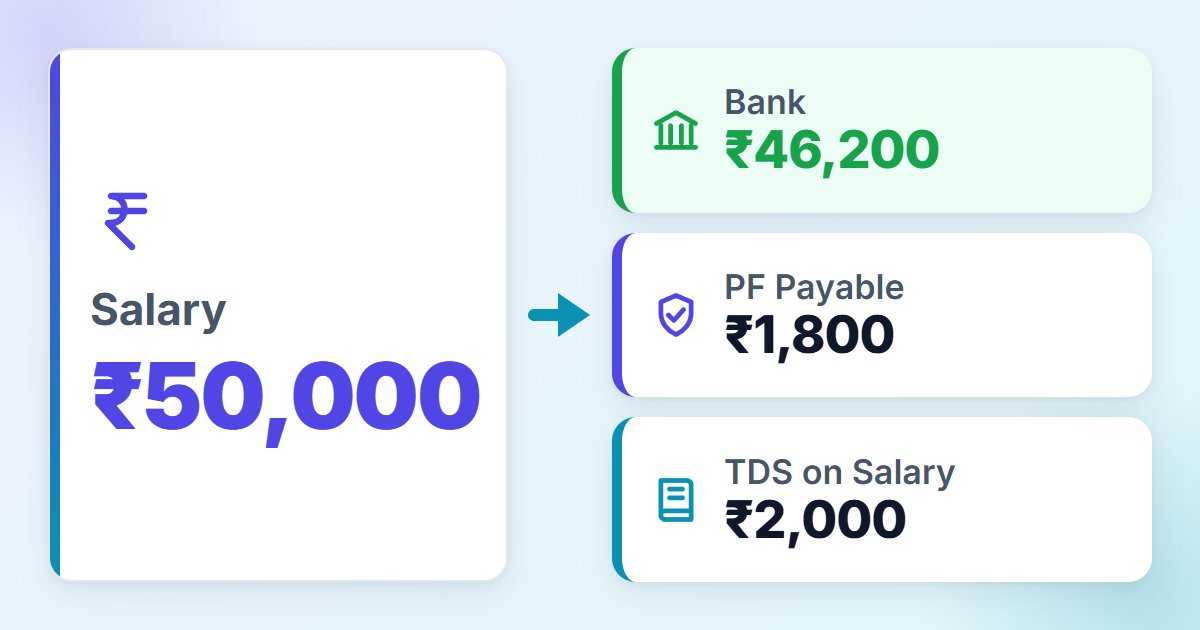
- Q2. Salary ₹50,000, with PF ₹1,800 and TDS ₹2,000 deducted? Debit Salary ₹50,000 and credit Bank ₹46,200. Credit PF Payable ₹1,800 and TDS on Salary ₹2,000. Employer PF is a separate entry. Debit PF Contribution, credit PF Payable. Deposit PF by the 15th, TDS by the 7th.
- Q3. Professional fees ₹30,000 under section 194J? Debit Professional Fees ₹30,000. Credit the consultant ₹27,000. Credit TDS 194J Payable ₹3,000, at 10%. Create the TDS ledger under Duties & Taxes, type TDS.
- Q4. Advance ₹1,18,000 received for services? Treat it as ₹1,00,000 value plus ₹18,000 GST. GST is payable on service advances when received. Goods advances carry no GST since November 2017. Use a Receipt voucher (F6) with reference type Advance. The advance goes in GSTR-1 Table 11A.
- Q5. Customer cheque ₹25,000 returned by HDFC Bank? Debit the customer, credit HDFC Bank, ₹25,000. Do not delete the original receipt. Bank charges plus 18% GST need a separate entry. Debit Bank Charges and input GST, credit the bank.
- Q6. Depreciation on machinery? Tally never calculates it for you. Pass a Journal (F7): Depreciation Dr, Machinery Cr. Depreciation sits under Indirect Expenses. Books use Schedule II rates; tax uses Income-tax Act rates.
- Q7. March rent ₹40,000 unpaid on 31 March? Debit Rent, credit Rent Payable. Rent Payable sits under Current Liabilities. If section 194-I applies, deduct TDS in this entry. TDS deducted in March is due by 30 April.
- Q8. Cash ₹50,000 deposited into SBI? Use Contra (F4), not Receipt. Debit SBI, credit Cash. Bank-to-bank transfers also go through Contra. No party or income is involved, so Receipt is wrong.
- Q9. Goods ₹10,000 plus 18% GST returned to the supplier? Press Alt+F5 for a Debit Note. Debit the supplier ₹11,800. Credit Purchase ₹10,000 and input GST ₹1,800. Select the original bill in Bill-wise Details.
- Q10. Book balance and bank balance differ? Open Gateway of Tally > Banking > Bank Reconciliation. Select the bank ledger. Enter Bank Date for each cleared entry. Uncleared cheques explain the gap. Charges or interest seen only in the bank need vouchers first.
How to Answer an Entry Question in TallyPrime 7.2 — Step by Step
- Create a test company via Alt+K > Create. Tally tip: set books beginning from 1 April 2026.
- Press F11 and set Enable Goods and Services Tax to Yes. Do the same for Enable Tax Deducted at Source. Skip this and ledgers show no tax fields.
- Go to Gateway of Tally > Create > Ledger. Choose the group first; it decides every report. Tally tip: Alt+C creates a missing ledger mid-voucher.
- Open Gateway of Tally > Vouchers and pick the type. F4 Contra, F5 Payment, F6 Receipt, F7 Journal, F8 Sales, F9 Purchase. Ctrl+H switches between Item Invoice and As Voucher.
- Verify each ledger balance after posting. Path: Display More Reports > Account Books > Ledger. Tally tip: Alt+F2 sets the period to the full year.
- Open GSTR-3B under Display More Reports > GST Reports. Check Uncertain Transactions before anything else. A missing RCM entry usually means a wrong ledger setting.
Mistakes That Cost Indian CAs Hours
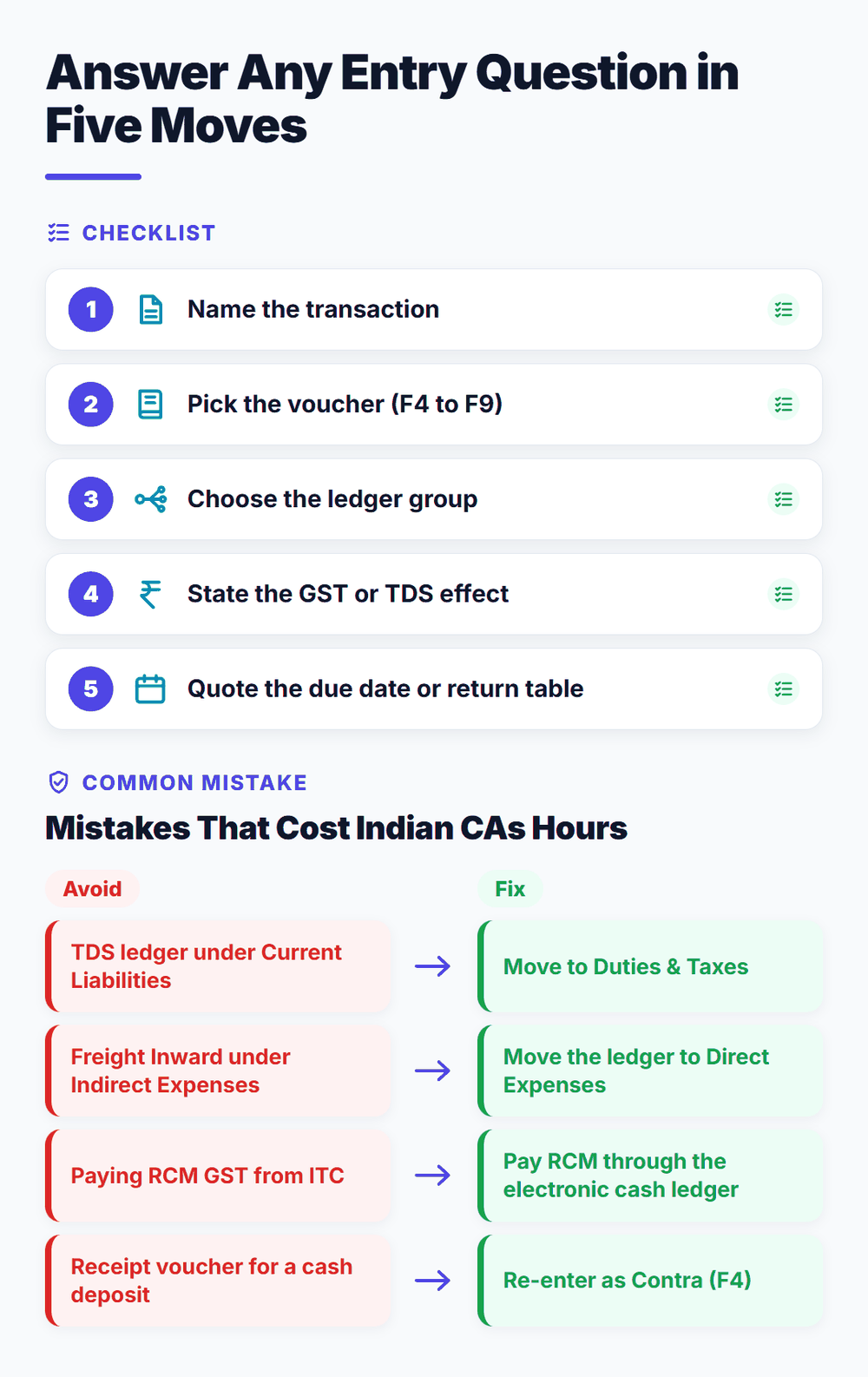
- TDS ledger under Current Liabilities. TDS reports and 26Q data skip it. Fix: Gateway of Tally > Alter > Ledger, move to Duties & Taxes.
- Freight Inward under Indirect Expenses. Gross profit shows higher than real. Fix: move the ledger to Direct Expenses.
- Paying RCM GST from ITC. The portal will not allow it. Fix: pay RCM through the electronic cash ledger.
- Receipt voucher for a cash deposit. Cash and bank books stop agreeing. Fix: delete it and re-enter as Contra (F4).
- Deleting the receipt when a cheque returns. Bank reconciliation can never match. Fix: keep the receipt and pass a reversal.
Pro Tips for 2026
Carry a one-page sheet of ledger groups. Interviewers ask "which group?" more than "which entry?" Learn GSTR-3B table numbers by heart. Saying "Table 4(A)(3)" signals real filing experience. Practise on a test company, never on live client data. Tally ERP 9 uses the same groups, so answers carry over. Only the menu paths differ.
Use this infographic on your site
Free to share. Copy this code and keep the credit link.
Q: How to answer account ke 10 most important questions in TallyPrime 7.2?
State the entry, the ledger group and the compliance impact. Then show it live in a test company. Use F4 to F9 for vouchers. Use F11 to enable GST and TDS.
Q: What is the entry for salary with TDS and PF in Tally?
Debit Salary for the gross amount. Credit PF Payable, TDS on Salary and Bank. Keep TDS under Duties & Taxes. Keep PF Payable under Current Liabilities.
Q: Which group is the TDS Payable ledger under in Tally?
Duties & Taxes, with Type of Duty/Tax set to TDS. Under Current Liabilities, TDS reports miss it. Fix it via Gateway of Tally > Alter > Ledger.
Q: Are these answers different in Tally ERP 9 and TallyPrime 7.2?
The entries and groups are identical. Only menus differ. Tally ERP 9 kept ledgers under Accounts Info. TallyPrime 7.2 uses Gateway of Tally > Create > Ledger.
Q: How long does it take to prepare these ten questions?
Plan two or three evenings with Tally open. Pass each entry yourself at least twice. Reading alone does not hold under interview pressure.